
Real-Time Supervision at Scale: Managing 2,000+ Queues with a Custom Genesys Dashboard
The Challenge.
The client migrated from a legacy call center platform to Genesys Cloud. While the migration brought modern infrastructure, it left a critical gap — their existing supervisor monitoring tools were incompatible with the new platform and could no longer be used. Supervisors were left without a reliable way to monitor agent activity in real time, creating several immediate problems:
- No visibility into agent status, availability, or live queue activity
- Over 2,000 queues to track simultaneously — far beyond what standard Genesys dashboards could visualise effectively
- No way to customise monitoring views to match the structure of different teams and departments
- Supervisors had to manage vastly different workloads with a one-size-fits-all interface
- No threshold alerting to flag when performance metrics fell outside acceptable ranges
- To provide a similar user experience to the previous system
The Solution.
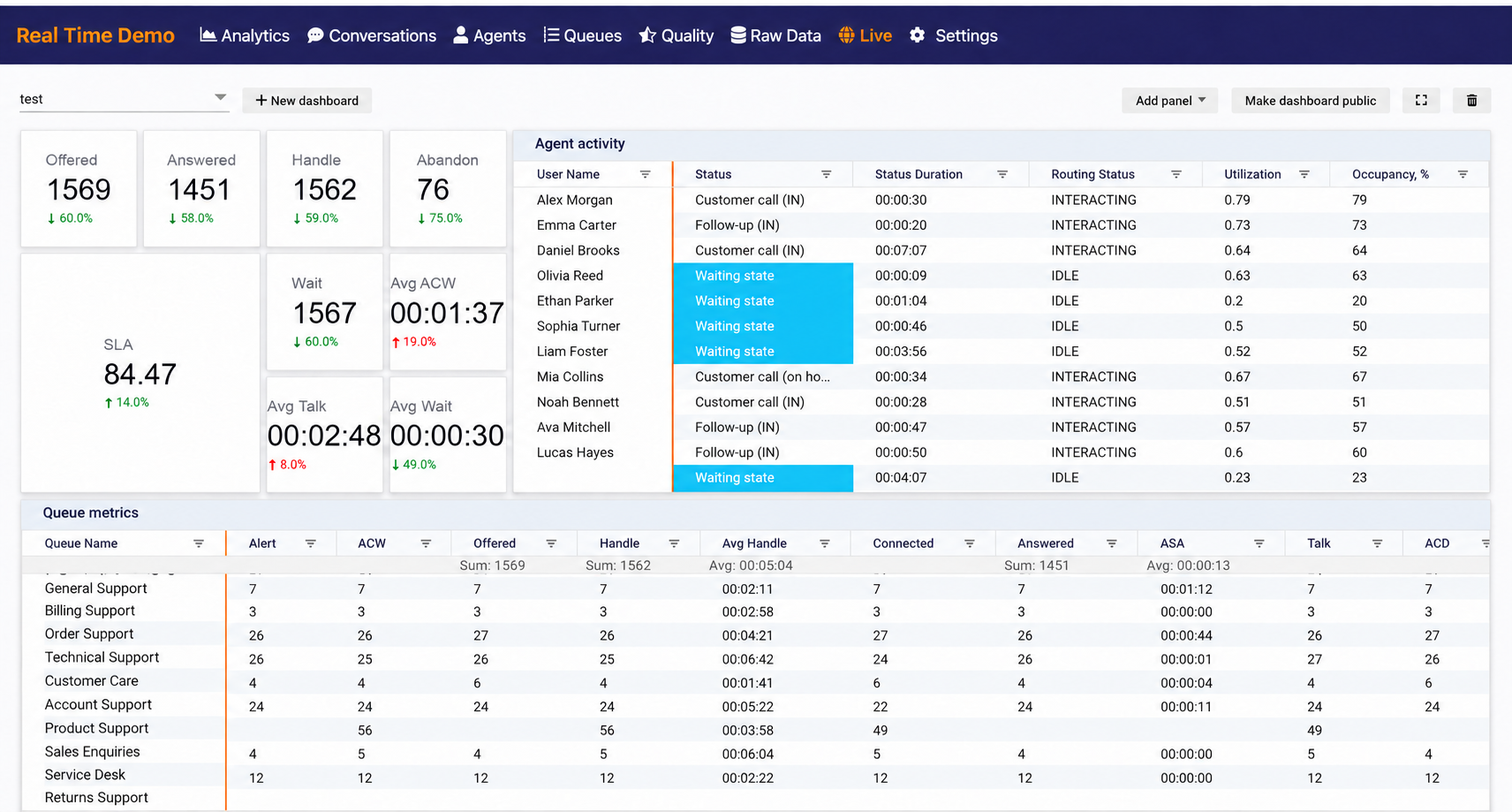
We developed a fully custom real-time supervisor dashboard built on top of Genesys Cloud, designed to handle the scale and complexity of the client's operation. Every aspect of the dashboard is configurable, persistent, and built to give supervisors complete control over what they see and how they see it.
Flexible Layout Management
Supervisors can build and arrange their monitoring workspace to match how their teams are structured. The dashboard supports drag-and-drop panel reordering, with dynamic collision handling that automatically shifts surrounding panels as you drag. Panels can also be resized freely, allowing supervisors to give more screen space to the queues or metrics that matter most.
Powerful Data Controls
With over 2,000 queues to manage, finding the right data quickly is critical. The dashboard provides a full set of controls to cut through the noise:
- Filtering — selectively view data based on specific criteria. Supervisors can filter by Genesys groups, queues, and individual agents, making it easy to scope the dashboard down to their own team without losing sight of the broader picture. An orange filter icon indicates active filters are applied
- Sorting — click any column header to toggle between ascending and descending order
- Column reordering — drag and drop column headers to arrange the grid in the most meaningful order for each supervisor's workflow
Panel Settings & Thresholds
Each panel can be individually configured through a settings dialog. Supervisors can select visible columns, apply layout preferences, and set two types of thresholds:
- Metric thresholds — define the time in seconds after which a threshold marker becomes visible on a performance metric
- Status thresholds — set time limits on agent statuses, making it immediately obvious when someone has spent too long in a particular state such as break, wrap-up, or idle
This allows at-a-glance identification of performance issues and status anomalies before they escalate.
Multiple Dashboards & Organisation-Wide Sharing
Supervisors can create multiple dashboards tailored to different teams, campaigns, or monitoring needs. Dashboards can be shared across the organisation, allowing managers to distribute standardised views to their teams or collaborate on a common monitoring setup without each supervisor having to configure from scratch.
Schedule a call.
Book a call with the Noralogix team. We look forward to talking to you.